
Connect your own domain
Put your site on a domain you own, like yourbrand.com — the two ways to connect, and how to choose.
Last updated 18 June 2026
Ready to move from yourname.sitesplaced.com to your own yourbrand.com? Connecting a custom domain is a paid upgrade, and you only need to set it up once. You'll need a domain you already own from a registrar like GoDaddy, Cloudflare, Namecheap, BigRock or Hostinger.
Don't own a domain yet? Buy one from any registrar first, then come back here to connect it. See current upgrade pricing on the pricing page.
Add your domain
- 1From your dashboard, open Settings → Store details.
- 2Find the custom domain field and type in the domain you own (e.g.
yourbrand.com). - 3Choose how you want to connect it — one-click or manual DNS (explained below).
- 4Follow the prompts, then wait a little while for the change to take effect across the internet.
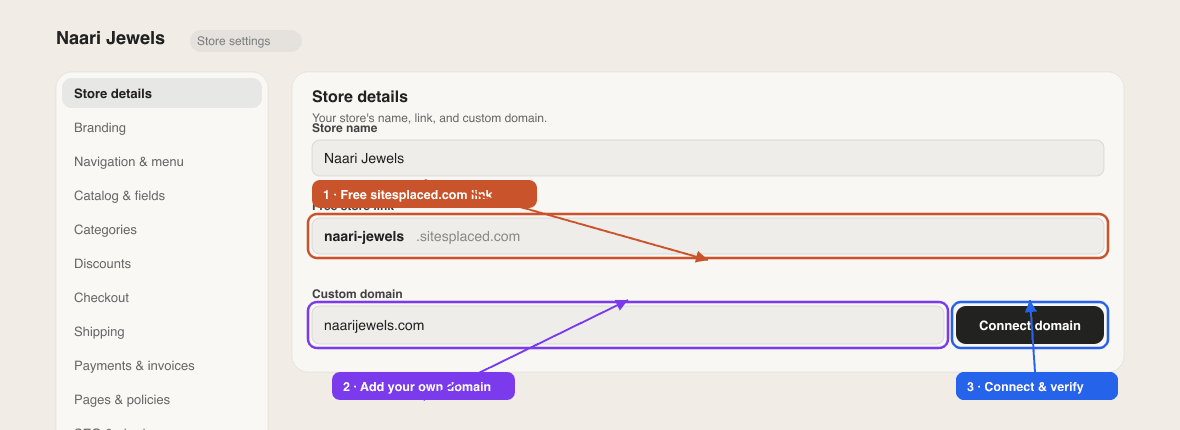
Two ways to connect
Connecting a domain means telling it to point at SitesPlaced. There are two ways to do that:
- One-click "Domain Connect" — for supported registrars (like GoDaddy and Cloudflare). You authorise it from a popup and the settings are configured for you automatically. This is the easiest option — see One-click Domain Connect.
- Manual DNS — you copy a few records SitesPlaced shows you into your registrar's DNS settings yourself. Works with any registrar — see Connect a domain manually with DNS.
Which should I pick?
If your registrar supports one-click Domain Connect, use it — it's faster and avoids typos. If it doesn't, or you'd rather do it by hand, the manual route works everywhere.
How long does it take?
Once you've set things up, the change has to spread across the internet — this is called DNS propagation. It's usually quick (minutes), but it can take up to a few hours. Your free yourname.sitesplaced.com address keeps working the whole time, so your site is never down.
Stuck partway through, or your domain isn't showing your site after a few hours? Contact support with your domain name and we'll take a look.
Related articles
Didn't find what you needed?