
How to get paid: choosing your payment setup
The three places payments live, and how to combine online (Razorpay), manual UPI/bank, COD and WhatsApp so customers can actually pay you.
Last updated 18 June 2026
Payments feel confusing at first because the controls live in three different places. Once you see why, it's simple:
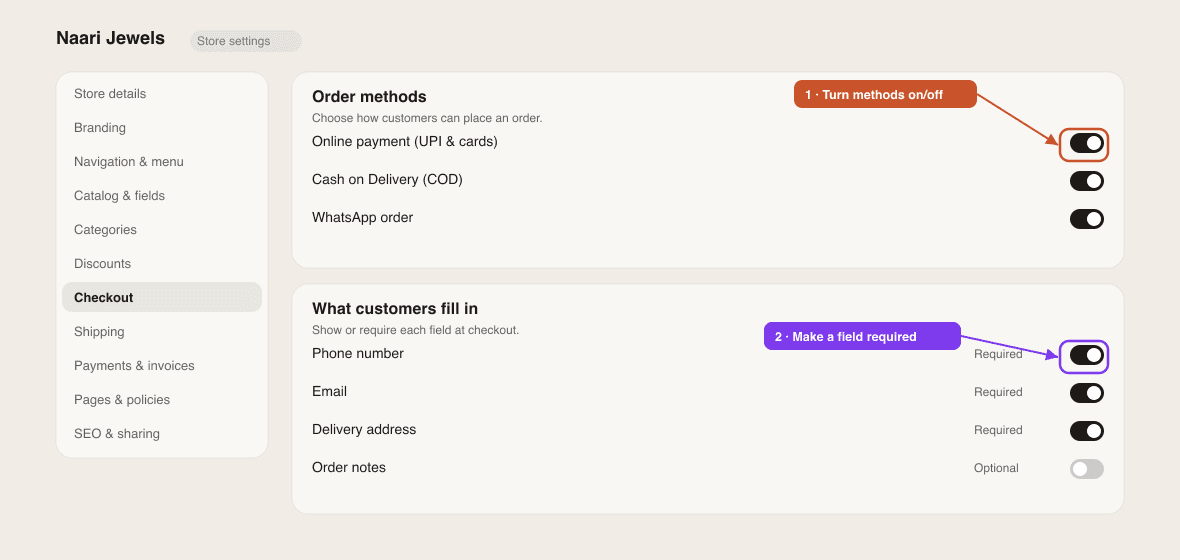
- Settings → Checkout — which order methods customers *see* (WhatsApp, COD, Pay with UPI / Bank Transfer).
- Settings → Payments & invoices — your UPI ID and bank details that show on invoices for manual/COD orders.
- Settings → Integrations — connect Razorpay for *instant online* payments (UPI & cards).
Pick your methods
You can offer any mix. Here's what each one means:
- Online payment (Razorpay) — customers pay instantly with UPI or card; the money settles to your own bank. Best experience, fewest "did you pay?" messages. Connect once in Integrations.
- Manual UPI / Bank transfer — customers see your UPI ID / bank details and pay you directly, then you confirm. No setup beyond entering your details.
- Cash on Delivery (COD) — customer pays when the order arrives.
- WhatsApp — the cart is sent to you on WhatsApp to arrange everything by chat.
Recommended setup
- 1Connect Razorpay for instant online payments — Settings → Integrations → Razorpay → Connect with Razorpay (no API keys; you sign in and approve). See Set up payments.
- 2Fill in your UPI ID & bank details under Settings → Payments & invoices, so COD and manual orders still have a clear way to pay.
- 3In Settings → Checkout, turn on the methods you want — e.g. keep COD on, and decide whether to also show WhatsApp.
- 4Place a test order on your live store to confirm the flow end-to-end.
0% commission
SitesPlaced takes no commission on your sales. With Razorpay you pay only Razorpay's standard gateway fee, and the money goes straight to your bank — we never hold it.
No Razorpay yet? Start anyway
You can sell from day one with COD or WhatsApp and collect payment manually. Add Razorpay whenever you're ready — nothing else needs to change.
Once orders come in, here's how to fulfil one, including marking COD/manual orders as paid.
Related articles
Didn't find what you needed?