
Set up payments
Connect Razorpay for online UPI & card payments, and add your UPI ID and bank details for manual/COD orders.
Last updated 18 June 2026
There are two sides to getting paid on SitesPlaced: online payments (where customers pay you instantly via UPI or card) and manual payment details (the UPI ID and bank details you show for COD or pay-on-confirmation orders). You can use either, or both.
Accept online payments with Razorpay
Online payments — UPI and cards — are handled by Razorpay. You connect your Razorpay account once and customers can then pay securely at checkout, with the money settling into your own bank account.
- 1From your store dashboard, open Settings → Integrations.
- 2On the Razorpay Payments card, click Connect with Razorpay.
- 3You'll be redirected to Razorpay to authorise securely — no API keys to copy, just sign in and approve.
- 4Once connected, the card shows Active. Customers can now pay online at checkout.
Don't have a Razorpay account yet?
You can still sell from day one — turn on Cash on Delivery or WhatsApp checkout and collect payment manually. See Checkout options.
You can pause online payments anytime with the toggle on the Razorpay card (customers then order via WhatsApp/COD), or Disconnect to remove it entirely.
Add your UPI ID & bank details
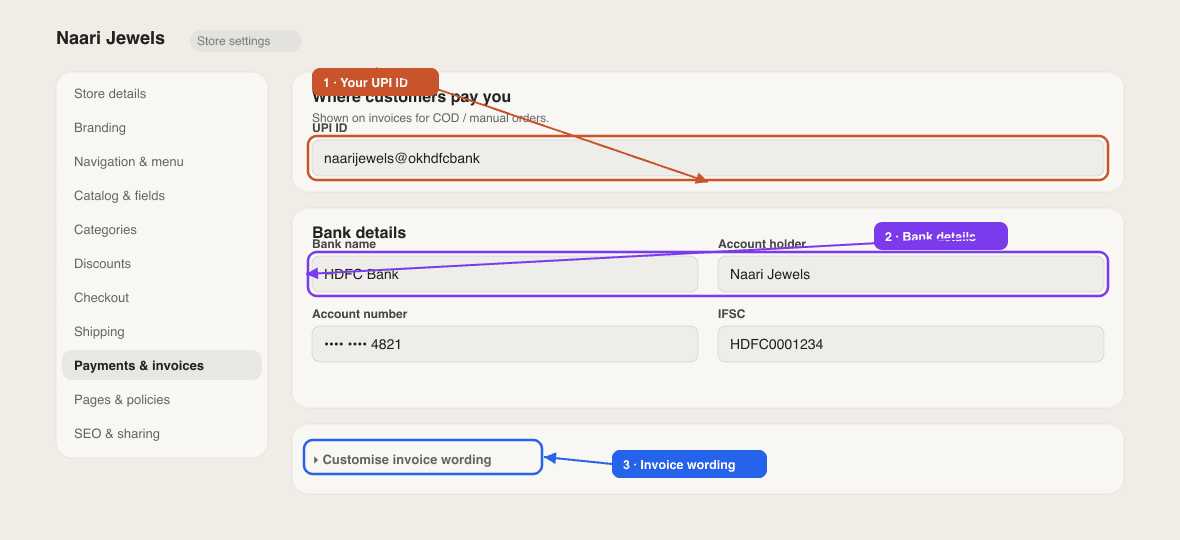
For COD and manual orders, customers need to know where to pay you. Open Settings → Payments to add them:
- UPI ID — e.g.
yourname@upi. - Bank details — bank name, account number, IFSC code, and account holder name.
- Payment instructions — a short note shown to customers (e.g. *"Pay via UPI and share the screenshot on WhatsApp"*).
These details appear on your invoices, so customers always know how to pay you — see Invoices.
Online payments and manual details work together. Connect Razorpay for instant online checkout, and fill in your UPI/bank details so your COD and WhatsApp orders still get a clear way to pay.
Does SitesPlaced take a commission on my sales?
No — there's 0% commission on your store sales. Razorpay charges its own standard payment-gateway fee on online transactions; that's between you and Razorpay.
Where does the money go?
Online payments settle directly into the bank account linked to your own Razorpay account. SitesPlaced never holds your money.
Can I accept international cards?
Online card and UPI payments run through your Razorpay account, so what you can accept depends on your Razorpay setup. If you need help, contact support.
Didn't find what you needed?