
Create & publish your store
Create a 0%-commission online store in minutes — pick a template, name it, publish free on a sitesplaced.com address, and share the link.
Last updated 18 June 2026
Your SitesPlaced store is free to build and free to publish — there's no commission on your sales, no limit on products or orders, and it works on phones out of the box. You only pay if you later want a custom domain, your branding removed, or premium add-ons.
Create your store
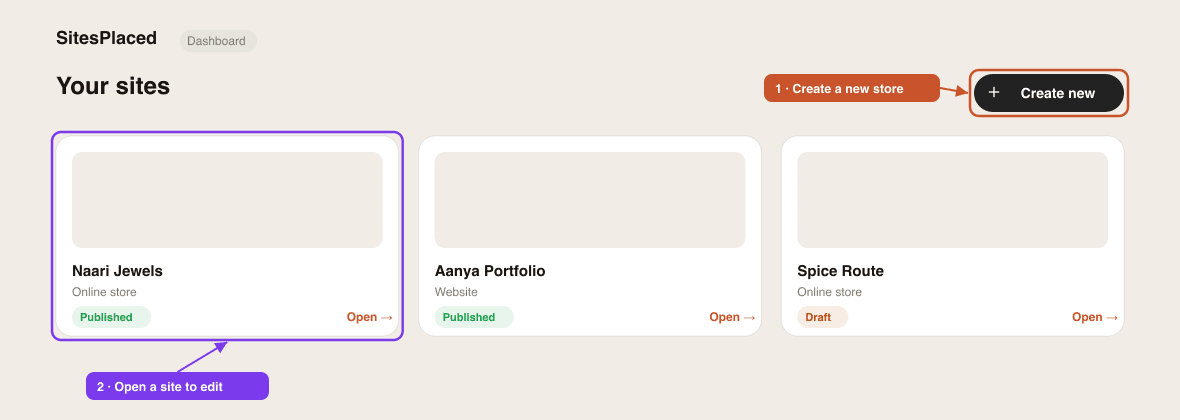
- 1Sign in at sitesplaced.com and open your Dashboard.
- 2Click Create new and choose Online store.
- 3Pick a storefront template that fits your brand. You can recolour and restyle it later, but the template itself is fixed once chosen — so pick the layout you like.
- 4Give your store a name. You're in — the store dashboard opens on the Home tab.
Already selling on Instagram or another site?
Use the Importer to turn an Instagram profile, a website, or a product PDF into a ready-made store — template, colours and products auto-filled. You can edit everything afterwards.
Set up before you launch
Two quick steps make everything else easier:
- 1Set up your catalog — tell the store how your products are priced and whether you track stock. Most sellers can leave the defaults, but it's worth a look.
- 2Add your products — at least one, so there's something to buy.
Publish & share
When you're happy, hit Publish (top-right of your dashboard). Your store goes live instantly at yourname.sitesplaced.com.
Share that link anywhere your customers are — WhatsApp, your Instagram bio, a story. You can also click Open Store to preview the live storefront yourself.
Want your own domain?
You can connect a custom domain like yourbrand.com on a paid plan — see Connect a custom domain.
Next: design your storefront and set up your menu.
Related articles
Didn't find what you needed?