
Manage orders & shipments
See incoming orders in your dashboard, view customer & payment details, update status, and track shipments — optionally via Shiprocket.
Last updated 18 June 2026
Every order placed on your store lands in one place: the Orders tab of your store dashboard. From there you can read the details, update the status as you fulfil it, and track the shipment.
Where your orders live
- 1From your store dashboard, open Orders.
- 2Click any order to open its details — items, quantities, total, payment method, and the customer's name, phone and delivery address.
- 3Move the order through its stages (e.g. confirmed → packed → shipped) as you work on it.
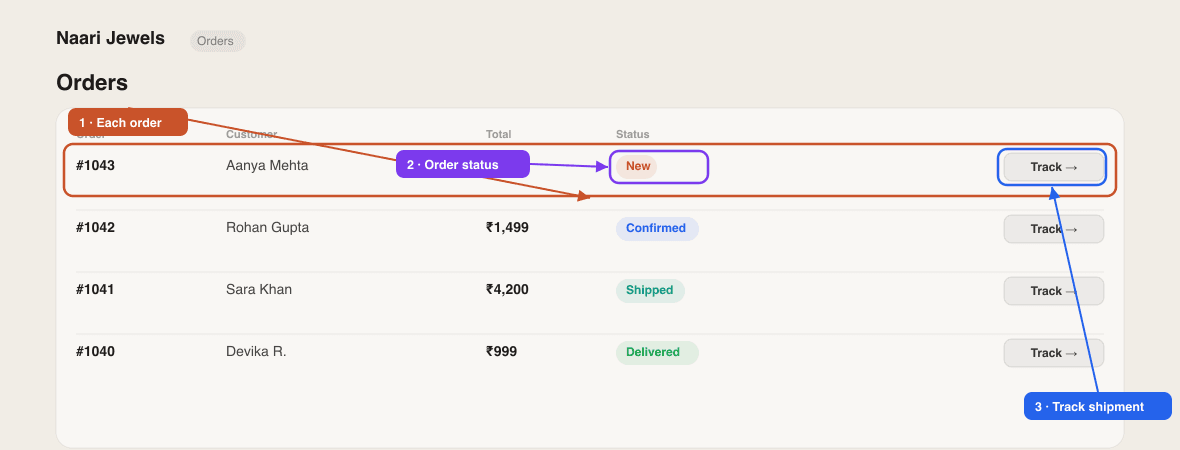
Online (Razorpay) orders show as paid automatically. For COD and WhatsApp orders, you mark payment yourself once you've collected it.
Ship & track orders
By default you ship orders yourself — pack them and hand them to whichever courier you like. If you'd like SitesPlaced to help generate labels and pull in live tracking, connect Shiprocket.
Connect Shiprocket (optional)
- 1Open Settings → Integrations and find the Shiprocket Logistics card.
- 2Click Set Up Shiprocket and follow the guided steps — sign up (or use your existing account), then enter your Shiprocket email and password to connect.
- 3Once active, confirmed orders are auto-pushed to Shiprocket so you can assign a courier, generate labels and request pickups.
Self-shipping is totally fine
You don't need Shiprocket to run your store. Plenty of sellers pack orders themselves and share a tracking link over WhatsApp. Connect Shiprocket only when you want courier automation.
Customers can also follow their own order from your storefront's Track Order page — keep that link in your menu (see Edit your store menu).
Courier rates, serviceable pincodes and delivery times come from the courier you use (or from Shiprocket) — SitesPlaced doesn't set or guarantee them. Always confirm coverage and timelines with your courier.
Didn't find what you needed?